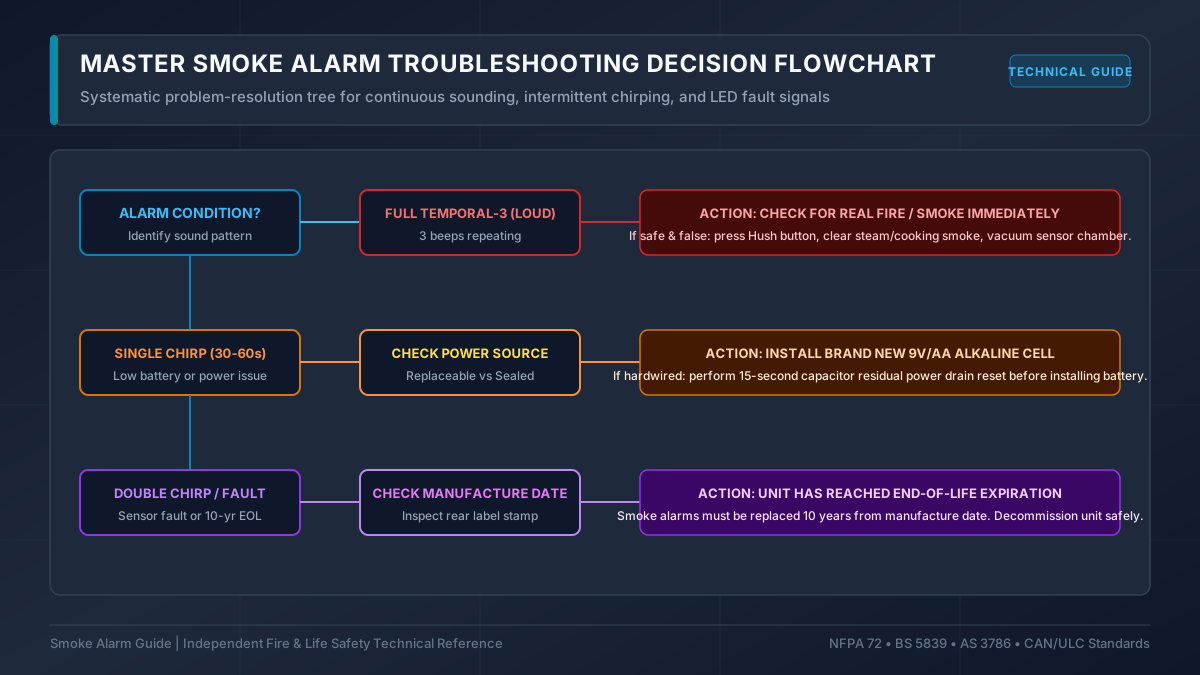
Troubleshooting a nuisance smoke alarm requires identifying whether the sound represents an emergency alarm, an environmental false trigger, a power failure, or a hardware end-of-life signal. Signal meanings vary across brands.
Audible Signal Diagnostic Reference
Use this diagnostic table to determine the most likely cause. Always cross-reference against your specific manufacturer manual.
| Audible Pattern | Most Common Causes | Important Caveat | Action Required |
|---|---|---|---|
| 1 chirp every 30 to 60 seconds | Low backup battery voltage, AC power interruption, or dirty optical chamber | On certain 10-year sealed alarms, this pattern indicates sensor end-of-life | Replace battery with fresh cell; verify AC breaker; vacuum dust from vents |
| Continuous 3-pulse loud siren (ISO 8201) | Combustion particles detected in chamber | Can be triggered by high kitchen steam, cooking smoke, or construction dust | Evacuate if fire exists; press Hush if verified false trigger from cooking |
| Continuous 4-pulse siren with pause | Carbon monoxide detected (combination smoke/CO unit) | CO is colorless and odorless; never assume a CO alarm is a nuisance false alarm | Evacuate all occupants to fresh air immediately and call emergency services |
| Chirping persists after battery replacement | Residual circuit charge holding fault memory, or dirty internal contacts | Check battery orientation and ensure battery pull-tab or drawer is fully latched | Perform a manufacturer-specified capacitor discharge reset (see guide below) |
| 2 quick chirps every 30 to 60 seconds | Hardware error, internal sensor fault, or end-of-life warning | Model-specific; check manufacturer guide (e.g. Kidde TruSense vs. First Alert) | Clean optical chamber; if chirping continues, replace the entire alarm unit |
How to Isolate False Alarms in Interconnected Systems
When hardwired or wireless interconnected smoke alarms sound simultaneously, identifying which unit triggered the system helps locate the actual hazard or faulty unit:
- Look for the Fast-Flashing Red LED: The initiating alarm will flash its red LED rapidly (typically once per second), while all other interconnected units flash only once every 40 to 60 seconds or not at all.
- Press the Hush Button on the Initiating Unit: Pressing Hush on the initiating unit will silence the entire network. Pressing Hush on a non-initiating unit will usually have no effect.
Specific Diagnostic Guides
Explore our dedicated diagnostic guides for step-by-step procedures:
- Why Is My Smoke Alarm Chirping? - Full root-cause breakdown.
- Chirping After Battery Replacement - Capacitor reset procedure.
- Smoke Alarm False Alarms - How to eliminate environmental triggers.
- Blinking Green Light Guide - AC power vs. polling status.
- Blinking Red Light Guide - Alarm latch and battery status.